
Piano - music & songs games
MWM - AI Music and Creative AppsMusic & Audio
4.79.32K Reviews
- Version
- 3.65.00
- Installs
- 10.00M
- Age Rating
- Everyone
Screenshots
Our Review of Piano - music & songs games
 Analysis by Appyee
I judge a music app by what happens after the first burst of curiosity: does it become a small, satisfying habit, or does it lose its appeal once the novelty wears off? Piano - music & songs games makes an inviting first impression because it turns playing familiar tunes into an easy activity rather than demanding a piano, a lesson schedule, or a long setup. I found it most appealing as a casual way to spend a few minutes with music. It is less convincing if what you want is a complete substitute for learning an instrument.
Why the first sessions are easy to enjoy
The basic attraction is straightforward: you can open the app and get started without knowing how to read music or having access to a physical keyboard. Its guided, game-like approach gives a beginner something immediate to do, which is often the hardest part of forming a practice habit. A short session can feel like play rather than homework, and that makes it easier to return to when you have a spare moment.
The app is a free music and audio app from MWM - AI Music and Creative Apps. It has a 4.7 average from around 259,000 ratings, and has been installed over 10 million times. Those figures suggest it has found a broad audience, though popularity alone cannot tell you whether its style will suit you. I would treat it as a low-friction musical pastime first and a learning tool second.
Getting Started: The First Few Notes
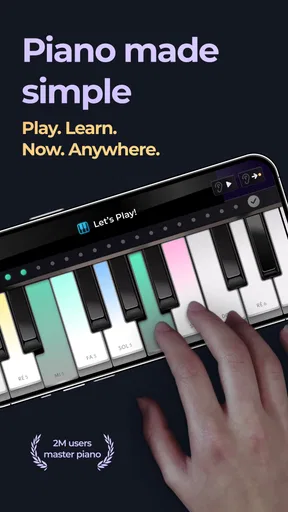
Downloading Piano - music & songs games was a breeze. The app is available for both Android and iOS, so no one misses out on the fun. Once installed, you're greeted with a sleek interface that's both welcoming and intuitive. No need to be a piano prodigy here; the app caters to all skill levels, making it perfect for beginners like me.
Right from the get-go, the app offers a quick tutorial, guiding you through the basic controls. It's a hands-on experience, so you're learning by doing, which I found super engaging. The app cleverly uses gamification to keep you hooked, and trust me, it works!
Features That Make You Want to Play On
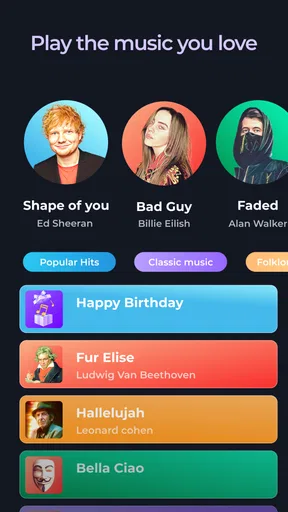
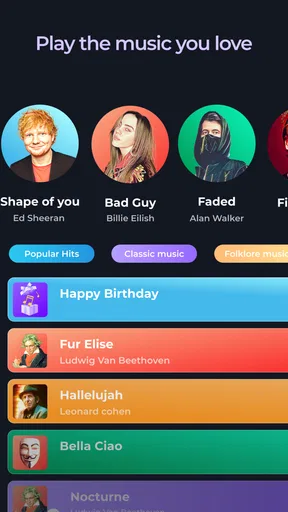
One of the standout features is the wide variety of songs available. From classical pieces to modern pop hits, there's something for everyone. I spent an entire afternoon playing "Fur Elise" and then smoothly transitioned to "Shape of You." The range is impressive.
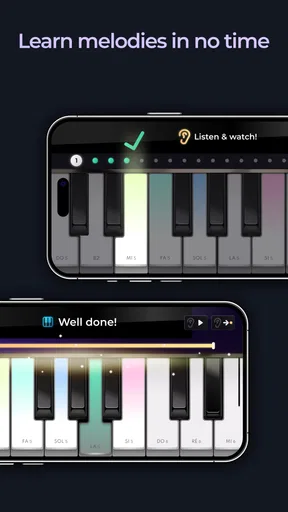
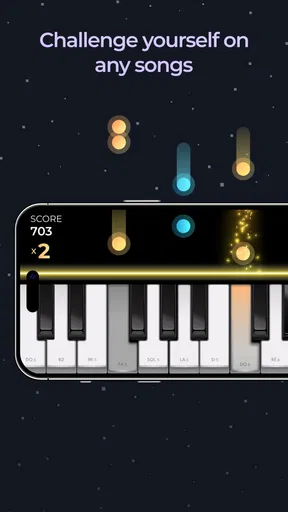
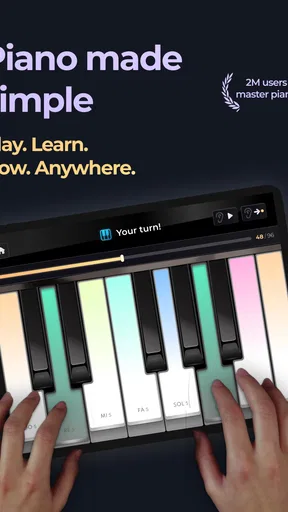
The app also offers different modes, such as the "Learn" mode, where you can take things slow and really focus on mastering a piece. Then there's the "Play" mode, which is more fast-paced and challenges your reflexes. This dual approach is fantastic for keeping things fresh and challenging at the same time.
Turning a quick session into a useful routine
For recurring value, I would use the modes with different intentions instead of treating every visit as a high-score run. A slower pass through a song gives you room to notice where your timing slips; a faster round can then test whether you can keep up when the prompts demand quicker reactions. That simple alternation makes a short practice window feel more deliberate without turning it into a formal lesson.
A realistic routine might be a few minutes while waiting for a ride or taking a break between tasks: choose one tune, repeat the tricky stretch, then stop before the session becomes a chore. The useful trick is to return to the same piece on another day rather than constantly browsing for something new. Familiarity makes progress easier to notice, while a fresh song can keep the app from feeling repetitive. I would not expect that routine alone to teach keyboard technique, but it can make musical attention a regular part of the day.
If you already play piano, the app may work better as a light reaction challenge than as serious practice. The screen-based format can give you a quick change of pace, but it does not replace the feel of weighted keys, hand positioning, or the freedom to choose your own fingering. For someone starting from zero, that distinction matters: the game can introduce patterns and encourage listening, but a real keyboard and structured instruction are better choices when the goal is transferable piano skill.
The Joy of Virtual Keys
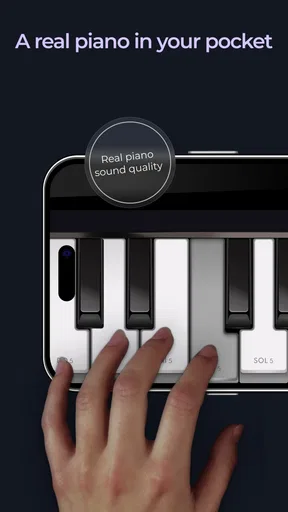
Playing on a virtual keyboard might sound daunting, but the app manages to make it feel surprisingly natural. The keys are responsive, and the sound quality is top-notch. It really feels like you're playing a real piano, minus the physical bulk and cost.
I also loved the instant feedback feature. After each session, the app provides a detailed report on your performance, highlighting areas for improvement. It's like having a personal piano teacher in your pocket, without the hefty fees.
What feedback can—and cannot—do
Performance feedback is most useful when I treat it as a pointer to revisit a passage, not as a complete diagnosis of my musicianship. A score or report can encourage another attempt and make a small improvement visible, but it cannot give the same guidance as a teacher watching your hands or listening to how you shape a phrase. If a section keeps causing trouble, repeating it slowly is a more sensible response than simply chasing a better result in one sitting.
There is also a practical difference between tapping a screen and playing an instrument. A phone is convenient for quick sessions, but the available playing area and touch response are not the same as a piano or full-size keyboard. I would try it on the device that feels comfortable to hold and tap, and avoid judging my real-world piano ability by how well I do in a game. That keeps the app enjoyable while setting realistic expectations.
Community and Connectivity
In today's connected world, it's no surprise that the app includes social features. You can share your progress with friends or compete against them in friendly challenges. There's also a leaderboard, which adds a competitive edge, making practice sessions even more exciting.
For those who love to collaborate, the app allows you to connect with other users. You can join groups, share tips, or even collaborate on a piece. It's a vibrant community that adds an extra layer of motivation.
Who will keep coming back
The social side will appeal most if friendly comparison helps you follow through. A challenge can give a session a clear purpose, while sharing progress can make a personal hobby feel less solitary. I would use those options as occasional prompts rather than letting a leaderboard define whether a practice session was worthwhile; a quieter attempt at a difficult passage can be more valuable than a higher score on an easier one.
On the other hand, if you prefer to play privately, or competition makes music feel stressful, those features are easy to regard as optional. The app is a better fit for curious beginners, casual players, and people who want a music-themed game to pick up in spare moments. Someone seeking a full curriculum, instrument-specific technique, or unrestricted musical experimentation is likely to get more from lessons, a physical keyboard, or a conventional music-learning app.
Staying power, friction, and alternatives
Compared with a standard piano-learning app, this one puts more emphasis on the immediate satisfaction of playing along and less on building a complete, structured course. Compared with a rhythm game, its piano framing and slower learning option may feel more musical, but the game-like pace can still dominate. That trade-off is the key to deciding whether it earns space on your phone: it offers an accessible reason to engage with piano sounds, not the depth or flexibility of a dedicated instrument setup.
Its maintenance burden is light in the everyday sense: there is no physical piano to arrange or tune, and a short screen session is easy to fit around other plans. The less visible cost is attention. Song browsing, repeated attempts, and score chasing can turn a relaxing break into a longer session than intended, so I would pick a tune before starting and set a natural stopping point. That keeps the app serving the habit rather than swallowing the time meant for it.
As a free download, it is easy to sample, but optional purchases are part of the experience, with individual items ranging from about one dollar to around ninety dollars. I would first see whether the available play and learning options hold my interest before paying for anything. A purchase makes sense only if it solves a specific problem for you, such as wanting more material; it is not automatically a shortcut to becoming a stronger pianist. The app is rated for Everyone, and its current version is 3.55.00, with Android 7.0 or later required.
In-App Purchases: Worth the Investment?
While the app is free to download, there are in-app purchases available. These range from additional songs to advanced lessons. As someone who's always cautious about spending on apps, I found the free content ample for casual play. However, if you're serious about learning and want access to the full library, the purchases are definitely worth considering.
Plus, the app frequently offers discounts and promotions, so keep an eye out for those sweet deals!
How novelty fades—and what remains
The first-week appeal comes from being able to try songs quickly and enjoy the feedback loop. Month to month, the stronger reason to return is having a handful of pieces you want to revisit, plus occasional challenges that make repetition feel different. If your interest depends entirely on unlocking new material, the experience may feel less compelling once you have played through the songs that initially caught your attention.
There is a fatigue risk in the same mechanics that make the app engaging: fast prompts and performance scores can encourage one more try even when you are no longer enjoying it. I would alternate between deliberate, slower practice and carefree play, and quit when the game starts to feel like a test. For regular instrument study, choose an option built around technique and a real keyboard; for quick musical amusement, this app has a clearer case.
Wrapping It Up: A Harmonious Experience
All in all, Piano - music & songs games is a delightful app that brings the joy of piano playing to your fingertips. It's perfect for those who want to learn at their own pace, enjoy a wide variety of music, and connect with other music lovers.
Whether you're a complete novice or a seasoned player looking for a fun way to practice, this app has something for you. So, if you're ready to make beautiful music, give this app a try. Trust me, you won't be disappointed.
My long-term recommendation
I would keep it installed if I wanted an easy, low-commitment music game to revisit between other activities, especially if familiar songs and friendly competition motivate me. I would not keep it as my only piano-learning resource, and I would be cautious about buying more content before establishing that I return often enough to use it. That is the fairest way to judge its lasting value: not by how exciting the first session feels, but by whether a brief, enjoyable routine still fits your life after the novelty fades.
Privacy and Permissions
See what permissions an app requests and how it handles your data.
- Photos/Media/Files
- read the contents of your USB storage, modify or delete the contents of your USB storage
- Storage
- read the contents of your USB storage, modify or delete the contents of your USB storage
- Wi-Fi connection information
- view Wi-Fi connections
- Other
- view network connections, full network access, control vibration, prevent device from sleeping, Google Play license check
Verdict
Strengths of Piano - music & songs games
- Wide range of songs available.
- Engaging gameplay for all ages.
- User-friendly interface.
- Regular updates with new content.
- Customizable difficulty levels.
Limitations of Piano - music & songs games
- In-app purchases can be pricey.
- Ads can interrupt gameplay.
- Limited offline functionality.
- Some songs require unlocking.
- Occasional app crashes.
Other Releases by MWM - AI Music and Creative Apps
View All
edjing Mix - Music DJ app
Music & Audio4.6

Beat Maker Pro - DJ Drum Pad
Music & Audio4.6

Guitar Tuner Pro: Music Tuning
Music & Audio4.3

Stemz: AI Tool for Musicians
Music & Audio4.4
Similar Picks in This Category
View All
YouTube Music
Google LLC4.4

Samsung Music
Samsung Electronics Co., Ltd.3.8

Spotify: Music and Podcasts
Spotify AB4.3

JioSaavn - Music & Podcasts
Saavn Media Limited4.3

Lark Player:Music Player & MP3
Lark Player Studio - Music, MP3 & Video Player4.6

StarMaker: Sing Karaoke Songs
SKYWORK AI PTE. LTD.4.3
Frequently Asked Questions
What features does the Piano - music & songs games app offer?
The Piano - music & songs games app provides a variety of features, including a wide selection of songs across different genres, interactive gameplay modes, and customizable difficulty levels. It also includes a tutorial mode for beginners, allowing users to master songs at their own pace. The app is designed to be both educational and entertaining, offering a rich musical experience.
Is the Piano - music & songs games app suitable for beginners?
Yes, the Piano - music & songs games app is perfect for beginners. It features a tutorial mode that guides new players through the basics of piano playing. The app also allows users to choose from simple songs to start with, gradually increasing the difficulty as they become more confident and skilled.
Are there any in-app purchases or subscriptions needed?
The Piano - music & songs games app offers a free version with basic features. However, to access premium songs and advanced features, users may need to make in-app purchases or subscribe to a premium plan. This allows for a more comprehensive and ad-free experience, suitable for those looking to enhance their learning and enjoyment.
How does the app enhance the learning experience?
The app enhances the learning experience by providing interactive feedback and progress tracking. It uses a game-like interface to keep users engaged while learning. The app also offers tips and tricks to improve piano skills, making learning fun and effective. Regular updates introduce new songs and challenges, ensuring continuous learning.
What devices and operating systems are compatible with the app?
The Piano - music & songs games app is compatible with both Android and iOS devices. It requires a minimum operating system version, typically Android 5.0 or iOS 10.0 and above. The app is optimized for smartphones and tablets, ensuring a smooth and responsive user experience regardless of the device used.
